Feature
Your grooming day on one screen: done, now, next and later
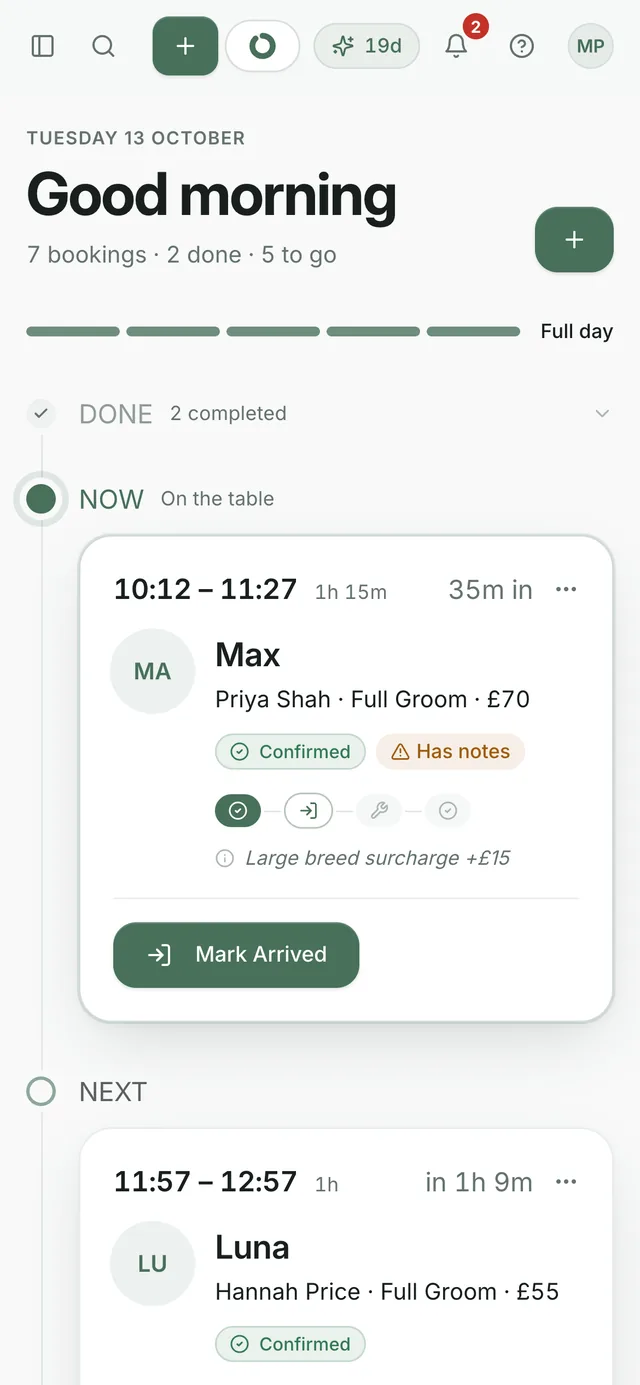
You've got a minute between dogs and you need to know who's next. Today shows the day's dogs in order, who's on the table and how full the day is. Mark each dog arrived, started and finished from your phone.
By Owen Fleming, founder of GroomRules · Published
The app opens on Today: your bookings as a timeline of done, now, next and later. Each card shows the dog, the owner, the service and the price. Tap to mark a dog arrived, start the groom and complete it. Completing it sets the dog's next recall.
How it works
How full the day is
Capacity at the top shows booked time against free time today, with the buffer between appointments counted in. Owners book into the gaps, so you can see how much room's left before you open the diary.
One tap per stage
Cards move through arrived, in progress and completed. Open a booking for no-show, approve or decline, cancel, and mark deposit paid. With several dogs from one house, one tap moves the whole group.
Calendar and Bookings behind it
They sit next to Today in the menu, for the week ahead and for finding a past appointment. New accounts also see a short setup checklist on Today.
Which plan it's on
OnFreeStarterProfessional
Today, the calendar and the bookings list are on every plan.
You get 30 days free with no card. When they're up, you choose Starter, Professional or Free. Pricing lists what's on each plan.
What it doesn't do yet
- A separate lane for bathers on Today. Bather time's planned into the diary, but Today shows one timeline.
- An app from the App Store. It runs in your phone's browser, and you can add it to your home screen for one tap.
- Google Calendar sync. We keep our own diary.
Need something that isn't here? Email owen@groomrules.com. It changes what gets built next. Every feature is listed on one page too.